Approvals · compliance · handover

Every approval condition, tracked to close

Every stage, every condition, every sign-off in one place. You always know what's outstanding and whose court it is in.


14 Baptist Street — Development Conditions LIVE
Fire suppression system
Condition 4.1 · Firemaster Pty
Approved
Structural engineer cert.
Condition 2.3 · Enstruct
Approved
Waterproofing membrane
Condition 6.7 · Hydroline
In Review
Mechanical ventilation
Condition 5.2 · Coolex Mech
Outstanding
APPROVAL PROGRESS50%
Erilyan
Ultra Building Co
Versatile Construction
INCA
Stillwater Group
Reitsma
Harbourland
North House
Sky Planning
Stargate Property
Erilyan
Ultra Building Co
Versatile Construction
INCA
Stillwater Group
Reitsma
Harbourland
North House
Sky Planning
Stargate Property

Project managers, builders, developers and certifying authorities run their approvals and handover on DocuBuild.

Data centres Hospitals Schools and campuses Class 2 residential Commercial fitout
$4B
Construction value managed through DocuBuild
1,000+
Builders, consultants, subcontractors and certifiers using it
8,000
Approval conditions tracked to close
The Old Way

Knowledge in many places

The consent it came from, the checklist to be built, a matrix of conditions, people's heads. No source of truth, and no way to see where the job is up to. That's where the weeks get lost.
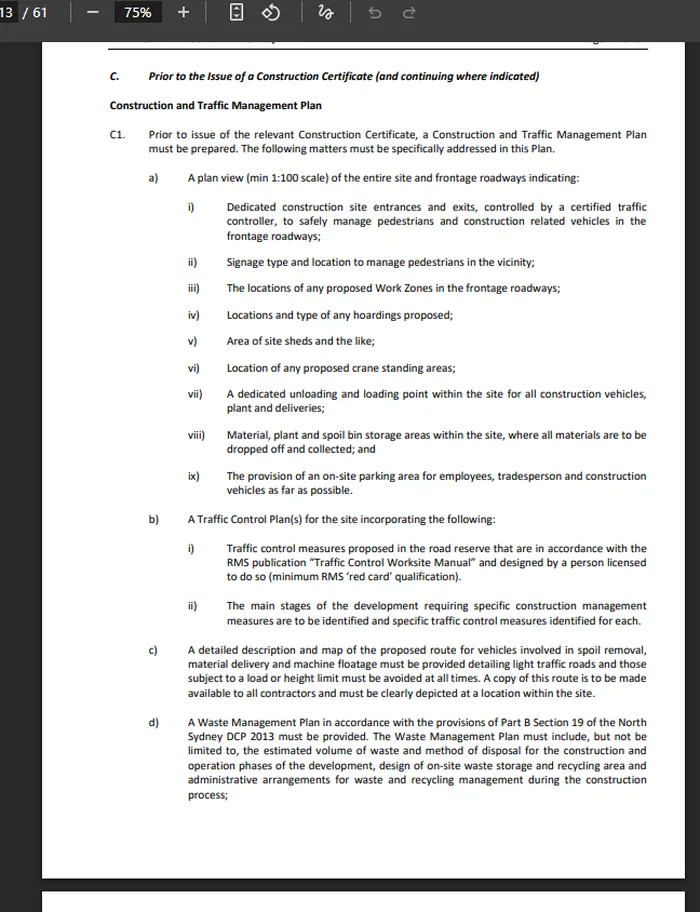
Development consent.pdf
A development consent showing conditions to be satisfied prior to a Construction Certificate

The consent61 pages of conditions that someone still has to turn into tasks with a name and a date on them.
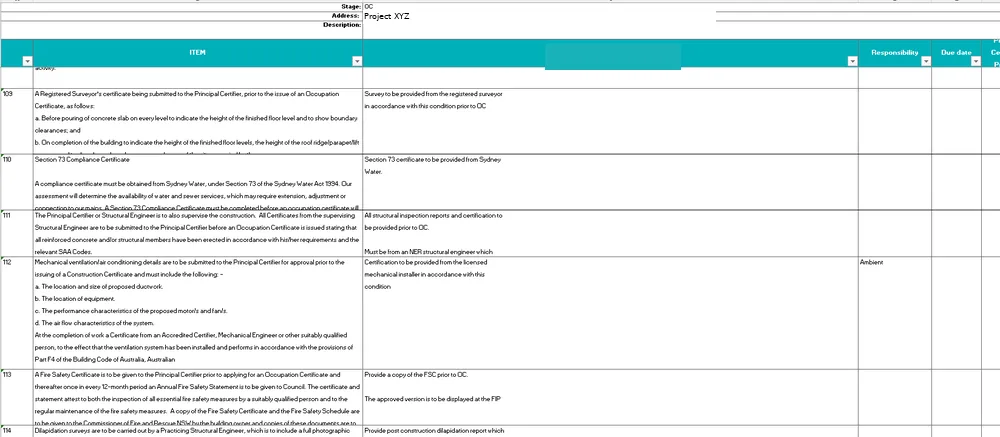
Approval checklist.xlsx
An Occupation Certificate checklist in Excel with empty responsibility and due date columns

The checklistManual hours holding it all together, responsibility and dates missing
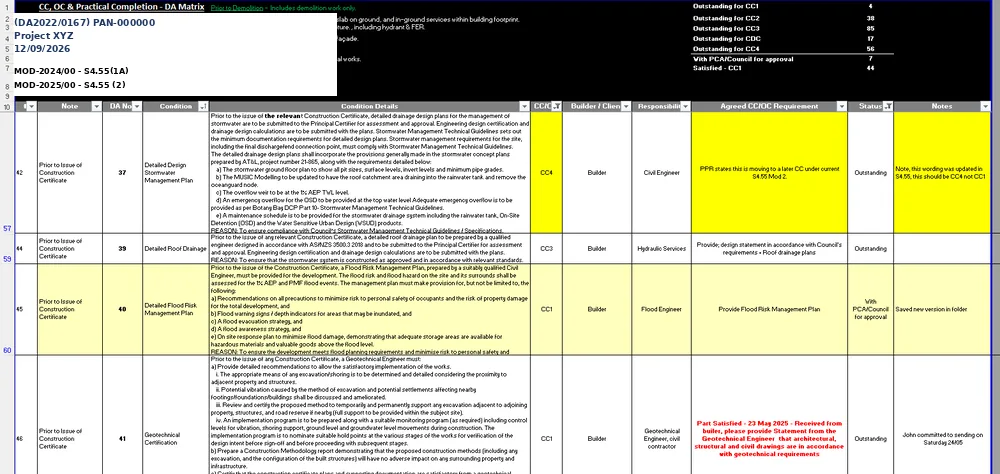
CC & OC matrix.xlsx
A CC and OC conditions matrix in Excel, colour-coded by hand

The matrix87 items outstanding. Manually updated. Nobody has a clear picture of where it's all up to.

The New Way

Fully connected, and supported

One live record between your consultants, the PM, and your certifier. Every condition carries its owner, its date and its evidence - so the status of the job is immediate, not something someone compiles.

Residential Apartments  ·  Conditions & checklist  43 items
Live
DocuBuild conditions and checklist register

Upload portal for consultants

Consultants and trades upload documents through a link, and it lands exactly on the right condition.

Automatic chasing

Reminders go out against the item and escalate as the date closes in.

Certifier-ready batches

Release when it's ready. They review and comment and update versions in the same record.

One live status

The same picture for the builder, the consultants and the certifier.

One platform, end to end

For every project stage

DocuBuild covers the whole approval and handover. Set up the conditions, chase the evidence, get it certified, and hand it over.

Set up

Conditions of consent & approval

Upload your consent, your templates or your existing checklists and we turn them into a live register, with every condition assigned and dated from the day it lands.

Upload templatesImport checklistsCondition registerConsent versionsModificationsLead times

Chase

Consultants, contractors & trades

Consultants and trades upload through their own portal, straight against the item. You see who owes what, what's overdue and where the gaps are, without asking anyone.

Upload portalsLive visibilityClear accountabilityGap analysisAuto remindersExcel export

Certify

Certifiers, building surveyors, independent reviewers

Your certifier reviews evidence in their own workspace and comments on the item, released in batches when you're ready.

Certifier workspaceBatch releaseDeclared designsDBP declarationsRevision controlAudit trail
Are you a certifier? →

Handover

O&M & warranties

The same record becomes the handover package. Indexed and searchable, not a folder of PDFs assembled at the end.

O&M manualsWarrantiesAs-builtsAsset registerManaged service
Chasing

Stop being the tracking and chase system

DocuBuild does the asking. Every request, every comment and every response sits on the item it belongs to, so the whole conversation is in one place and everyone can see who is holding what.

  • Reminders against the item

    The specific document, the condition it belongs to, and the date it's needed by. Escalating on their own as the date approaches.

  • Comments flow in one thread

    Consultant, project manager and certifier all comment on the same item. No forwarding, no cc lists, and no wondering which version of the answer is current.

  • Accountability without asking

    Every item shows who owns it and where it's up to. Consultants and trades upload through a link, with nothing to install and nothing to learn.

OUTSTANDING · 14 BAPTIST STREET
Hydraulic clearance
ACOR · due in 5 days
REMINDED
Acoustic report
Renzo Tonin · due in 12 days
REMINDED
Landscape sign-off
Site Image · overdue 3 days
ESCALATED
Waterproofing warranty
Hydroline · received today
UPLOADED
Electrical compliance
Voltex · received Tuesday
UPLOADED

What teams say

Having everything tracked in one place, from condition compliance through to O&M submissions, reduced the back and forth significantly and gave us confidence going into handover.
Everything is in one place and my certifier saw it directly. We knocked six weeks off our closeout.
We were managing it across too many places. DocuBuild pulled it into one system and made the whole process a lot less stressful.
A great tool for taking multiple emails and correspondence out of the equation.
This is a game changer. I'll be passing your details on to the other builders.
A modern and intuitive platform that simplifies how handover documentation is managed.

Frequently asked questions

What is the value of DocuBuild?

Builders report closing out around six weeks faster, and not having to hold the whole thing in your head to get there.

You stop chasing. Reminders go out on their own, consultants and trades upload against the item rather than into an inbox, gaps surface while they are still fixable, and your certifier reviews in the same record instead of sending emails back and forth. One place, everyone in it, removing the traditional back and forth that slows projects down.

We already manage this in SharePoint and Excel. Why change?

Because SharePoint is storage, not a process. Someone still has to collect the documents, rename them, file them, update the register, work out what is missing and chase the consultants. That someone is usually your contract administrator, and whatever they don't get to this week doesn't arrive.

It also means things fall through the gaps quietly. A superseded revision, a missed sign off, a certificate filled out incorrectly. You find those when the certifier opens the file, and then the back and forth begins.

DocuBuild puts your consultants, your trades and your certifier into the same review process, so the gaps surface while there is still time to do something about them.

How long does onboarding take?

Minutes, not weeks. Send us your live checklist and we will have it set up while we are on the call with you. Every item loaded and tagged by trade and discipline, with nothing summarised or dropped. Your team is invited straight away, and your consultants, trades and certifier need no logins, just a link. If you have already finished stages, send us those too and we will load them retrospectively so DocuBuild holds the whole project rather than starting from wherever you happen to join.

We use Procore.

Keep using it. Procore runs the build. RFIs, drawings, defects, site records, cost. It is your system and we are not trying to replace it.

The issue is that your certifier doesn't have a Procore login, and neither do most of your consultants. So everything from construction certificate through to occupation certificate still runs on email and a spreadsheet, and that is where the weeks go. That is the part we fix.

We work directly with certifiers, so the whole chain sits in one place. A Procore document sync exists if you want it, but most teams find the checklist was never in Procore to begin with.

Our certifier doesn't want to use another platform.

They don't have to. They get a read only link with your checklist in their own format, and they can download the lot and review offline exactly as they do now.

Most stay in the platform once they see it, because documents arrive already renamed and filed against the right item, and they can see just what has changed since their last review rather than re downloading a whole submission. That is the part certifiers tell us saves them the most time. If yours reviews offline, statuses get updated the way you do now, but the management, the chasing, the versions and the audit trail all still work for you.

We're a developer. Our builder manages this.

That is usually the case, and DocuBuild is built first for whoever is actually running the process.

It still earns its place on your side. You get visibility across every project without asking for an update, and you see blockers while they are still blockers rather than after they have become holding costs. You are in the same record as the certifier and the trades, so when your builder says the occupation certificate is on track, you can see whether it is.

Does this work outside New South Wales?

Yes. DocuBuild is configured for NSW, Victorian and Queensland requirements. Every one runs the same job: an approval with conditions, evidence against each one, and an authority who signs it off. What changes is the vocabulary. Construction and occupation certificates in New South Wales, building and occupancy permits in Victoria, building approvals in Queensland. Registered certifier, building surveyor, private certifier. All of it is configuration on the checklist item, not a different product. The NSW Planning Portal integration is our main integration focus and actively in build, with the goal of lodging straight from DocuBuild rather than manually splitting zip folders and mapping your certifier's checklist categories onto the Portal's document types. Ask us where it is up to and we will give you a current answer.

What does it cost?

$5,000 per project, for contract sums up to $40m. One fee, from the day the project starts through to occupation and handover. Every stage is covered, with unlimited users and your certifier, consultants and subcontractors all included. No per-user fees, no per-condition fees.

Where is our data stored, and where does AI sit in this?

Amazon Web Services in the Sydney region. All client data, documents and backups are stored in Australia, encrypted at rest with AES-256 and in transit with TLS 1.2 or higher. Backups run hourly incremental and daily full, geo redundant within Australia, retained for 35 days with monthly archival held for twelve months. Restores are tested quarterly.

AI is used in one place only. It reads the consent documentation and proposes checklist items from its conditions. Nothing else touches a model, so search, evidence handling, review and decisions are conventional software. Every proposed item is reviewed, edited, merged or rejected by a person before the checklist is issued, and no status or decision is ever set by a model. Consent document text is the one thing that leaves Australia, processed under terms that prohibit training on client data and held only for a short abuse monitoring window. Extraction can be turned off entirely.

We operate to controls aligned with ISO 27001 and SOC 2 Type II. A full security and data overview is available on request.

See DocuBuild on one of your projects

Thirty minutes, nothing to prepare. Bring a live job and we will walk it through with you.

For certifiers and building surveyors

Your job is assessing buildings. Not admin.

The system builds checklists, updates naming and keeps things organised.You do the work, the system does the admin

Book a walkthrough Better for your team. Better for your clients.
123 Works Street
Construction certificate
Certifier: Bayside Building Surveyors · Class 2 · Structure stage
11 of 14 conditions resolved79%
Every condition listed. Documents appear as the project team submits them.
Structure and waterproofingConditions 8–11
8
Structural engineer certification for slab and frame
2 documents · Enstruct · 4 Sep
Satisfied
9
Façade performance solution and fire engineer sign-off
1 document · 2 comments · with certifier since 9 Sep
In review
10
Balustrade compliance certificate, levels 2 and 3
Requested from Alumex · reminder sent 10 Sep
Outstanding
11
BAL assessment and bushfire construction measures
Filtered out — BAL-LOW, not applicable to this site
N/A
Services and authority approvalsConditions 12–13
12
Section 73 compliance certificate
1 document · Sydney Water · 28 Aug
Satisfied
13
Fire safety schedule and essential measures list
2 documents · Firemaster Pty · 3 Sep
Satisfied
Built by DocuBuild in 41 minutes — no time from the certifier's team

Value from your first project

Send us a consent document or checklist

We'll have it live and show you the client view on the same call. No commitment.

You qualified to assess buildings, not to rename files

Five jobs eat a certifier's week, and none of them need your qualification. Here is what each one costs you today, and what happens to it in DocuBuild.

Today

Handled manually, every project

In DocuBuild

Supported and automatic

Pulling conditions out of the consent

Reading the consent, extracting every condition, typing them into a checklist and tagging them by stage and discipline. Every project, from scratch.

Consents and checklists load instantly

Drop in the consent or your existing template. Every condition comes out coded, tagged by trade and discipline, nothing summarised or dropped. Minutes, not an afternoon.

Filtering out what doesn't apply

Twenty-forty minutes a stage deleting irrelevant lines, because the master template covers every building type and this one is Class 2, BAL-LOW, three storeys.

The checklist filters itself

Items carry conditions for classification, construction type, storeys, climate zone, BAL and staging. The right checklist generates for the project in front of you.

Documents arrive unorganised

links and zip files flying around, named inconsistently, and you have to piece it all together and reorganise the lot before you can start.

Released in batches, already structured

Documents arrive indexed against the condition they satisfy, in your checklist order, when the project team releases them. Nothing to sort before you begin.

Renaming every file

Opening each document, checking what it is, renaming it to your convention and filing it. Invisible work that never appears on a fee proposal.

Renamed and filed automatically

Every upload named to your convention and filed against the item it satisfies.

Updating the register after every review

Mark up the documents, then go back to the spreadsheet and update statuses by hand so the client knows where things stand. Then email it.

Review in the platform, register updates itself

Mark items satisfied, request changes, comment on the item. Your client sees it immediately. No spreadsheet to maintain and no version to send.

The admin nobody budgets for

Filing documents is the visible half. Building condition schedules, splitting them and rebuilding them every time a consent is modified is the half that costs more, because it takes a certifier rather than an administrator.

Renaming and filing documents

Administrator work
Administrator, loaded cost
$56 / hour
Documents across a typical project
200
Time to check, rename and file each one
1 minute
Projects a year, mid-size practice
1,200
Annual cost, by hand
$224,000

Building and maintaining condition schedules

Certifier work
Certifier, loaded cost
$110 / hour
Conditions on a typical consent
110
Time per condition, extract to reconcile
5 minutes
Projects a year with a condition schedule
400
Annual cost, by hand
$403,000

Admin nobody budgets for, a year

$627,000

Substitute your own numbers. Loaded costs are salary plus on-costs, covering superannuation, payroll tax, leave, insurance and overhead, spread across billable hours. Handling and reconciliation times are assumptions, and we would measure them against your practice during a pilot rather than ask you to take ours. Condition work is counted only on projects carrying a consent schedule, so complying development is excluded.

Any jurisdiction

Registered certifier, building surveyor, private certifier, independent certifier. Whatever the title, the job is the same: requirements, evidence, review, sign-off. Jurisdiction is a filter on the checklist item, not a different product, so your templates and your local language load in rather than needing a rebuild.

Your data

Where the records live

Compliance records carry evidentiary weight, so the audit trail is treated as a core control rather than a logging feature.

Hosted in Australia

Amazon Web Services, Sydney region. All client data, documents and backups stored in Australia. AES-256 at rest, TLS 1.2 or higher in transit.

An audit trail that stands up

Immutable history on every checklist item covering creation, modification, supersession, status change and decision, with the identity and timestamp of the party responsible. Superseded versions are never overwritten or deleted. Exportable as evidence for dispute, insurance or regulatory purposes.

Scoped access

Role based and project scoped. Subcontractors and consultants get an upload link limited to the requirements assigned to them, with no visibility of the wider project.

Your data, and you can take it

You own all data, documents and compliance records at all times. Self service export at any time at no cost, in original file formats with a structured CSV and JSON manifest. On termination, a complete export within 10 business days at no cost.

See it on one of your projects

Send us a consent document or checklist and we will show you the client view on the same call.

One price per project

Every approval condition tracked from the day the project starts through to occupation and handover. No per-user fees, no per-condition fees, and no charge for the consultants, trades and certifier you invite.

Most projects

Standard project

$5,000per project

Contract sum up to $40m

One project, start to finish. Conditions tracked, consultants chased, and the pack assembled the way your certifier wants it.

  • Every approval condition tracked to close
  • Consultant and trade portals, unlimited people
  • Certifier workspace, included
  • Full document register and audit trail
Start a project

Major project

$7,500per project

Contract sum above $40m

For larger programs with staged approvals, more consultants and a heavier condition load.

  • Everything in a standard project
  • Staged approval packages, however many stages
  • Onboarding session for your project team
  • Named contact through to handover
Book a demo

Several projects

Let's talk

Builders and project managers

Running a pipeline rather than a project. We'll set a rate across the program so each new job starts without a new approval.

  • One rate across every project you run
  • Portfolio view across the program
  • Your standard conditions preloaded
  • Invoicing arranged to suit your cost codes
Talk to us

Everyone else on the project is free

One party holds the project and pays for it once, whether that's the builder, the developer or the project manager. Everyone else they invite works in DocuBuild at no cost, with no seat limits, now or later.

  • CertifiersYour own workspace, your format, never charged.
  • ConsultantsUpload and respond without a licence or a login.
  • TradesMobile upload by link, as many as the job needs.
  • Project managersFull access to run the project, assign items and report.
  • Owners and clientsVisibility across the project.

Handover manuals

By practical completion we already hold every certificate, warranty and consultant contact on the project, so the O&M manual and asset register are built from what's already there rather than chased from scratch.

Priced per project against building class and scale, and quoted when the project reaches practical completion. Most builders are replacing a documentation consultant they have already budgeted for.

Ask about handover

Nothing missing when you submit

Run the project in DocuBuild and bring your trades in with you. Gaps surface early instead of at the end, and your certifier gets the pack in their format, first time, ready to action.

The documents come from your consultants and trades. DocuBuild chases them and shows you who is holding what up.

Already know DocuBuild, or want to see how something works before you commit? Browse the support library →

Not sure which fits?

Tell us what you have running and we will tell you what it costs.